Habit Tracker Layouts: Simple Grids for Your Bullet Journal
How to draw a monthly habit tracker grid step by step, plus a weekly mini tracker, ring and mini-calendar variants, and what to do with blank squares.

Tutorial at a glance
Materials
- 0.3 mm fineliner
- Pencil and eraser
- 6-inch (15 cm) ruler
- Mild-color highlighters
- Light gray marker
Most habit tracker layouts are variations on one idea: a small mark for each day a recurring task gets done. In a bullet journal that makes the tracker a record-keeping tool. It tells you which days the plants were watered or the budget was reviewed, and it gives you something concrete to look at when you plan the next month.
This guide covers the standard monthly grid step by step, a smaller weekly version, two alternative shapes, and the practical questions that come up once the grid is drawn: how many rows to include and what to do with the squares that stay blank.
Choose a few habits to track
Start with three to six rows. Every row is something you have to remember to mark, and a short tracker is quicker to fill in and easier to read back. Good candidates are simple, repeatable and easy to answer with yes or no:
- water the plants
- read 10 pages
- tidy the desk
- practice guitar
- take out the recycling
- review the budget
Write each one as a short label of two or three words. If an item only happens on certain days, such as recycling pickup, that is fine; you will mark the other days as not applicable.
Draw a monthly grid step by step
A month needs up to 31 squares in a row, which is more than the width of most A5 pages. The easy fix is to turn the notebook sideways. A typical A5 dot-grid page is roughly 26 squares across and 38 down, so in landscape you get about 38 squares of width. Count your own page before you start.
- Turn the notebook so the long edge of the page runs left to right.
- Use the top 2 rows for a header with the month name.
- Reserve a label column 7 squares wide on the left. On a 38-square page that leaves exactly 31 squares for the days.
- On row 4, write the day numbers 1 to 31 above the day squares, one per square. Small numerals from a 0.3 mm fineliner fit best.
- On row 5, write the first habit label in the left column. Rule a horizontal line above and below the row across the full width.
- Skip one row and repeat for each habit. Six habits use about 12 rows.
- Draw the vertical lines between days in pencil first, check that the last column lines up with day 31, then ink them.
- Shade the weekend columns lightly with a gray marker so the weeks are easy to tell apart.
If your page has fewer squares, make the label column narrower or carry the grid across both pages of the spread. For clean lines without smudges, see the tips on using a ruler on a dot grid.
How to mark the squares
Pick one way of marking and use it for the whole month. The common options are a filled square, a diagonal slash, a dot or an X. Filling squares with color gives the clearest picture at a glance; a slash is fastest.
One color per habit makes the rows easy to tell apart, and it is worth adding those colors to your bullet journal key if you reuse them in other spreads.
A weekly mini tracker
If a full-month grid feels like too much page, put a small tracker inside your weekly layout instead. It needs only seven marks per row and takes about two minutes to draw.
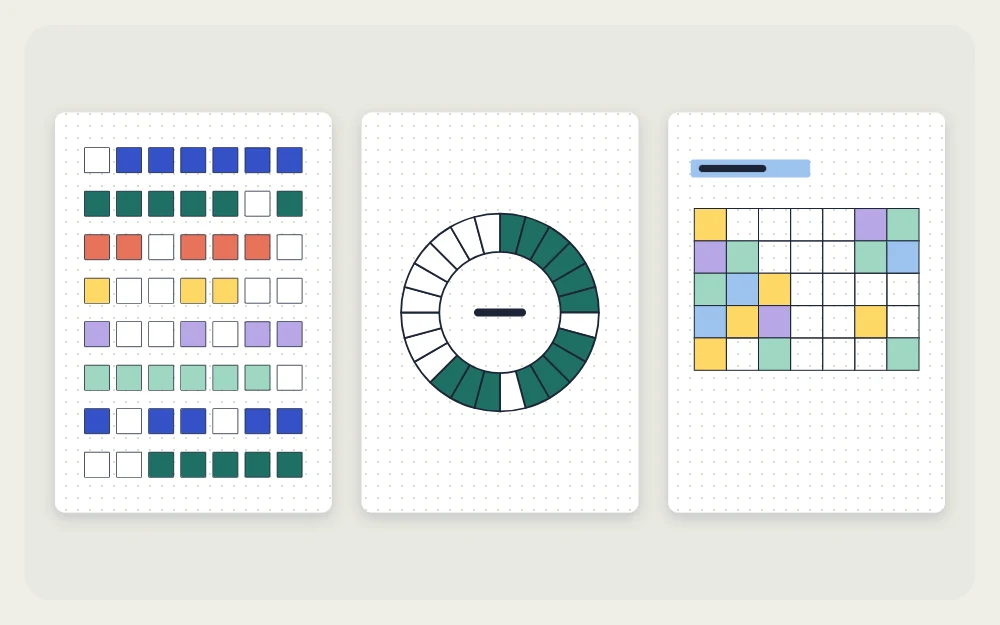
Make a block with a label area about 6 squares wide and seven circles to the right of it, one per day, each circle sitting in its own square with a square of space between them. Add a row of day initials above. Four rows fit in a box about 20 squares wide and 9 tall, which slots into the notes area of a simple weekly spread.

Ring and mini-calendar variants
The square grid is the most space-efficient shape, but two others are worth knowing.
Ring tracker
Draw two circles, one inside the other, and divide the band between them into one segment per day. Each habit gets its own ring, or you nest several rings for several habits. It looks striking and takes longer: dividing a circle into 30 or 31 even segments needs a protractor or patient pencil work. Use it for one or two habits at most.
Mini calendar blocks
Give each habit a small calendar, 7 squares wide and up to 6 rows tall, laid out like the month. You color the date square when the task is done. This version shows weekday patterns clearly, for example that guitar practice mostly lands on weekends.
Compare the layouts
| Layout | Best for | Rough drawing time |
|---|---|---|
| Monthly grid | Three to six habits over a full month | About 15 to 20 minutes |
| Weekly mini tracker | Items that change from week to week | About 2 minutes |
| Ring | One or two habits, decorative pages | About 20 to 30 minutes |
| Mini calendar blocks | Seeing which weekdays get marked | About 15 minutes |
What to do with blank squares
A blank square is a record too: it says the task did not happen that day. Leave it blank. Filling in squares from memory several days later makes the page less accurate, and an accurate page is the point of keeping one.
It helps to separate “not done” from “not applicable”. Put a small dash in squares for days when the task could not apply, such as days away from home or days with no recycling pickup. Then a truly blank square always means the same thing.
At the end of the month, count the marked squares in each row and write the total at the end of the row. Use the totals when you set up the next tracker:
- A row that was marked almost every day may not need tracking any longer.
- A row with a clear rhythm, such as twice a week, can move to a weekly tracker or become a fixed task on those days.
- A row that stayed mostly blank can be reworded, moved to your monthly goals page as a one-time task, or dropped.
Frequently asked questions
How many habits should I put in a bullet journal tracker?
Three to six rows is a practical range for a monthly grid. Each row is one more thing to remember to mark, and a short grid is faster to fill in and easier to read back at the end of the month. You can always add a row next month.
How do I fit 31 days across an A5 page?
Turn the notebook sideways. A typical A5 dot-grid page has about 38 squares along its long edge, which leaves room for a 7-square label column and 31 day squares. Count your own page first; if it is shorter, narrow the label column or run the grid across two pages.
Should I fill in tracker squares I forgot to mark?
Only if you are sure what happened that day. A tracker is a record, and guessing makes it less accurate. Leave unknown days blank, and use a small dash for days when the task did not apply, so blank squares and not-applicable days stay easy to tell apart.