Bullet Journal Migration: How to Review and Move Tasks
How migration works in a bullet journal: the monthly review step by step, the four decisions for every open task, why rewriting acts as a filter, and how to move into a new notebook.
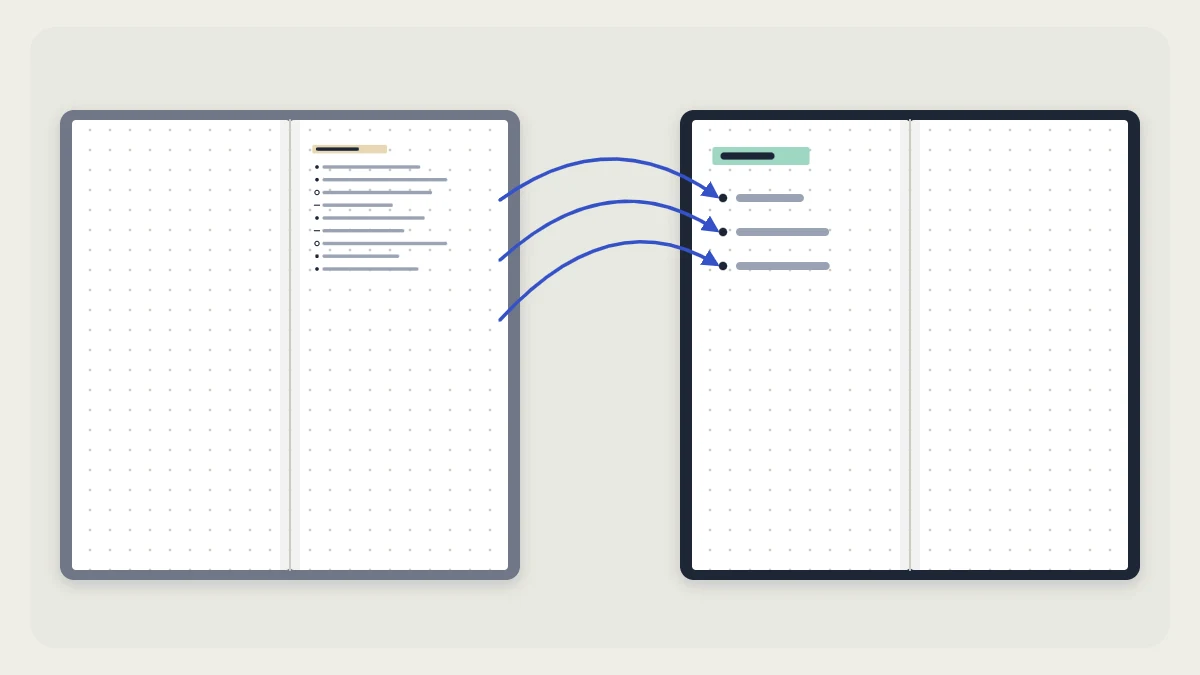
Bullet journal migration is the step that keeps a notebook from turning into a stack of old lists. At regular points you look back over what you wrote, decide what still matters, and carry only that forward to a fresh page.
It is part of the original method created by Ryder Carroll, described on the official Bullet Journal site, and it needs nothing more than a pen and roughly 15 to 20 minutes at the end of each month.
What migration means
To migrate an entry is to rewrite it by hand in a new place and mark the old copy as moved. It happens at three scales:
- Day to day: an open task from yesterday is copied into today’s log.
- Month to month: the main review, where every open task of the month is checked.
- Notebook to notebook: when the pages run out, the live contents move to a new book.
The marks are the standard ones. A task starts as a dot (•). It becomes an X when completed, a right arrow (>) when migrated, a left arrow (<) when scheduled into the future log, and is struck through when cancelled. If any of these are new to you, the bullet journal key explains each symbol.
The monthly review, step by step
Do this on the last evening of the month or the first morning of the next one.
- Set up the new monthly log first, so there is somewhere for tasks to go.
- Turn back to the first page of the month that is ending.
- Read every daily or weekly page in order, looking only for task dots that are still open.
- Make one of the four decisions below for each open task, and change its bullet to match.
- Skim the notes (–) and events (○) for anything that should become a task or belongs in a collection.
- Add the new month to your index.
When you finish, no plain dot should be left anywhere in the old month. Every task has a visible outcome, so you never need to reread those pages to find loose ends.

Four decisions for every open task
| Decision | Mark | What you do |
|---|---|---|
| Done | X | Nothing more. Some tasks were finished but never marked. |
| Move forward | > | Rewrite it in the new month’s task list. |
| Schedule | < | Write it in the future log under the month it belongs to. |
| Drop | Struck through | Cross out the whole line and let it go. |

Scheduling is the decision people forget. A task that cannot start until March does not need to be copied into January and February on the way. Send it straight to the bullet journal future log and pick it up when that month is set up.
Rewriting as a filter
Copying a task by hand costs a few seconds, and that small cost is the point. If a task does not seem worth writing out again, that is a fair sign it can be dropped. A digital list carries everything forward for free, which is why such lists only ever grow. A handwritten one has to be chosen again each month.
Watch for tasks that keep moving. One simple way is to add a small tick after a task each time it migrates. When a line has two or three ticks, stop copying it and choose one of these instead:
- Rewrite it as a smaller first step, such as “find the form” in place of “renew passport.”
- Give it a date and schedule it.
- Strike it through.
Tip
When you rewrite a task, tighten the wording. Start with a verb and name the next physical action, so the new line is clearer than the one it replaces.
Moving into a new notebook
A notebook change is a larger version of the same review. Use the old index as your checklist and go through it line by line.
Carry forward:
- open tasks from the last month
- future log entries with dates that have not passed
- collections you are still adding to
- your key, if it has not changed
Leave behind finished collections, old trackers and completed months. They stay readable on your shelf.
Before you put the old book away, write its start and end dates on the cover or spine and give it a number. A reference such as “2.45,” meaning notebook 2, page 45, then lets the new index point back to old material without copying it. If the switch falls at the turn of the year, the page order in the new year bullet journal setup shows where each migrated item goes.
Keeping collections alive
Collections are undated, so the monthly review passes over them. They need their own decision when you change notebooks:
- Copy in full when the list is short and in constant use, such as a list of gift ideas.
- Copy only open items when a long list is mostly done, such as a home project with three steps left.
- Leave and reference when the page is something you look up but rarely add to. Note its old notebook and page number in the new index.
Within one notebook, a collection that runs out of room simply continues on the next blank spread, with the page numbers linked by threading. More ways to organize these pages are in bullet journal collections.
Common migration problems
- No time for a full review. Do a short version: tasks only, no notes, about ten minutes. A partial review beats a skipped one.
- Everything gets moved forward. If the new list is as long as the old one, go through it once more and ask which lines you would add today if they were not already there.
- Dots left open. An unmarked dot from two months ago will raise the same question every time you see it. Decide once and mark it.
Watch out
Do not tear out or cover old pages after migrating. The marked-up originals are your record of what was done, moved and dropped.
Frequently asked questions
How often should tasks be migrated?
The main migration is monthly, when a new monthly log is set up. Smaller ones happen whenever a new daily or weekly page begins and open tasks from the previous page are copied across. If monthly feels too far apart, a short weekly check of open dots works on the same principle.
What is the difference between the right arrow and the left arrow?
A right arrow means the task was moved forward into the next month's list or another current page. A left arrow means it was scheduled: written into the future log under a later month. Both show that the original line is closed and the task now lives somewhere else.
Do notes and events need to be migrated too?
Usually not. Events have already happened and notes are a record, so both stay where they were written. The exception is a note that turns out to need action or belongs with related material. In that case, rewrite it as a task or copy it into the matching collection.