New Year Bullet Journal Setup: Pages to Create First
The order to set up a fresh notebook for a new year: index, key, year at a glance, future log, yearly goals and the first month, plus what to migrate from the old notebook and what to skip.

Tutorial at a glance
Materials
- New A5 dot-grid notebook
- 0.3 mm fineliner
- Pencil and eraser
- 6-inch (15 cm) ruler
- One mild-color highlighter
- Last year's notebook and a calendar
A new year bullet journal setup goes faster when you know the order of the pages before you open the notebook. The front pages depend on each other: the index needs page numbers, the future log needs room, and the first month should be the last thing you draw, not the first.
The sequence below fills about ten to twelve pages and takes roughly one to two hours if you keep it plain. Decoration can be added later, once the structure is in place.
Before you draw: three quick decisions
- Count your page. A typical A5 dot-grid page has roughly 26 to 27 squares across and 38 to 39 down, but notebooks differ. Count yours and note the numbers; the examples here use 26 by 38.
- Number the pages. If they are not printed, number at least the first 30 in a bottom corner.
- Look through last year’s notebook. Note which spreads you were still using in the final months. Those are worth setting up again. Anything abandoned by spring is not.
The page order
- Index: two to four pages at the very front.
- Key: one page, or the inside cover.
- Year at a glance: one two-page spread.
- Future log: one or two spreads.
- Yearly goals: one page.
- First month: monthly log, then your first week or day.

Start each two-page spread on a left-hand page so both halves face each other. If that leaves a single page stranded, give it to the key or the goals page. Enter each section in the index as soon as you finish it.
Copy the key from your old notebook unless you want to change it. A new year is a sensible moment to remove symbols you stopped using; the bullet journal key guide lists the standard set to fall back on.
Year at a glance: twelve mini calendars
This spread shows the whole year at once, six months per page, in two columns of three. Each mini calendar is 7 squares wide and 8 squares tall: one row for the month name, one for weekday initials and six for the weeks.
- Across a 26-square page, mark two calendar columns 7 squares wide with 4 squares of space on each side and between them: 4 + 7 + 4 + 7 + 4.
- Down a 38-square page, mark three blocks 8 squares tall with 3 squares above the first, 4 between blocks and 3 below the last.
- Tick the corners of all six blocks in pencil, then repeat on the facing page.
- Check a calendar for the weekday each month starts on and pencil in the dates, one number per square.
- Ink the numbers with a fine pen, about 0.3 mm, and erase the pencil when dry.
Decide on a Sunday or Monday start before the first number goes in, and use the same start for every monthly log that follows.
Use this spread for looking, not writing. Mark birthdays, holidays and trips with a small colored dot or a highlighted square, and keep the details in the future log.
Future log and yearly goals
The future log holds dated items for months you have not set up yet. A common arrangement is three boxes per page, so one spread covers six months and two spreads cover the year. Layout options are compared in the bullet journal future log article; pick one and draw it now, while the pages near the front are free.
For goals, a single page divided into four boxes keeps the year visible without turning into a long wish list. On a 26-square page, two boxes of 12 squares with a 2-square gap fit exactly. Give each box a header bar and four or five checkbox lines.
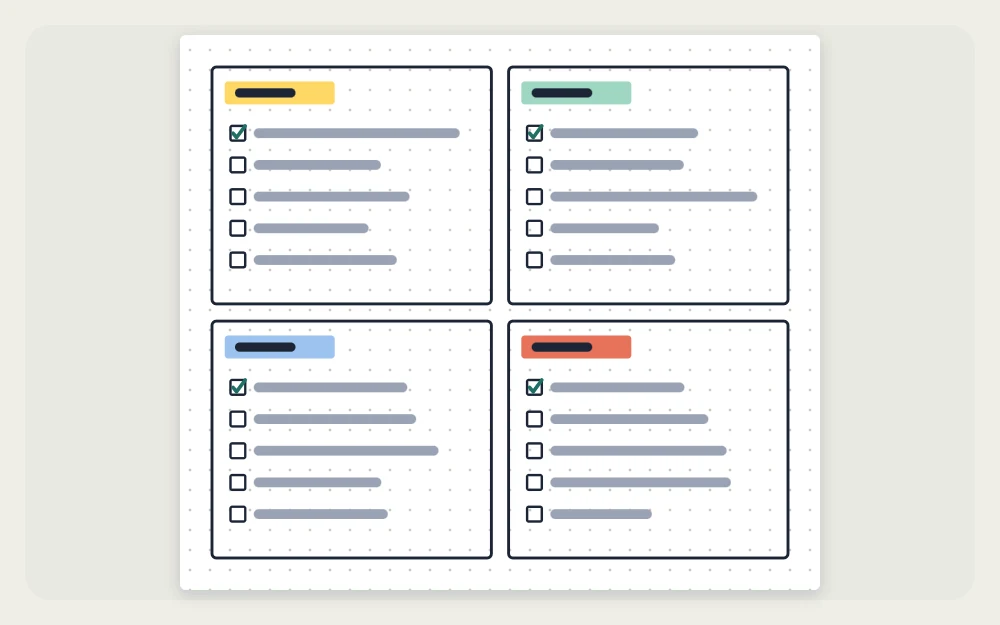
Choose four areas that fit your year, for example home, learning, creative projects and money. Write each goal as something you can finish and check off: “repaint the hallway,” “read 12 books,” “learn three songs on guitar,” “review the budget every month.” Leave a line or two empty in each box for goals that appear later.
What to migrate from the old notebook
Go through the old index and carry over only what is still live:
- Open tasks from December go into the January task list.
- Known dates for the new year, such as birthdays, renewals and booked appointments, go into the future log.
- Active collections, such as a to-read list or a home project, get a fresh page after the first month, or a note in the new index pointing to the old notebook.
- Unfinished goals you still care about go onto the new goals page, reworded if the old wording did not help.
Mark each moved item in the old notebook with a right arrow (>) so nothing is copied twice. The full review routine is covered in bullet journal migration.
What to skip
- Twelve pre-drawn months. Your preferred layout will change during the year, and fixed pages leave no room for collections in between.
- A full year of trackers. Set up one month, see whether you use it, then decide.
- Finished collections. They stay in the old notebook.
- An elaborate cover. It can be added to the first page later, or left out.
Watch out
Do not ink the mini calendars from memory. One month started on the wrong weekday means redrawing a whole block, so check every month against a printed or phone calendar first.
Set up the first month last
With the reference pages done, turn to the next free left-hand page and draw January. The grid method is in how to set up a monthly spread. Then:
- Copy January’s dated items from the future log into the month.
- Write the migrated tasks in the month’s task list.
- Pick one step from each goal box and add it as a task.
- Add the month to the index.
- Start your first weekly spread or daily log on the next page.
Tip
Leave one blank spread between the goals page and January. It gives you room for a collection you have not thought of yet without breaking the run of months.
Frequently asked questions
Does a new notebook have to start in January?
No. The same page order works at any point in the year. Start the future log with the next full month, and draw the year at a glance for the twelve months ahead, or only for the months left in the calendar year. Unused pages from the old notebook can simply stay blank.
How many pages should be reserved for the index?
Two pages are enough for most notebooks if only months and collections are listed, not every weekly spread. Reserve four if you tend to create many collections or write long entry names. Extra index pages cost little, while running out means splitting the index across the notebook.
Is a year-at-a-glance spread necessary?
It is optional. It helps if you often need to check what weekday a date falls on or want to see holidays and trips across the whole year. If a wall or phone calendar already covers that, skip it and give those two pages to the future log instead.