How to Set Up a Monthly Spread in Your Bullet Journal
A step-by-step calendar grid across two A5 pages: how to count the squares, rule seven columns and five or six rows, add a header row and leave a sidebar for notes.

Tutorial at a glance
Materials
- Pencil and eraser
- 6-inch (15 cm) ruler
- 0.3 mm or 0.5 mm black fineliner
- A calendar for the month
A monthly spread puts every day of the month in front of you at once, so you can see where the appointments cluster and where the open days are. The most familiar version is a calendar grid: seven columns for the days of the week and one row for each week.
This walkthrough draws that grid across two facing pages of an A5 dot-grid notebook, with a narrow sidebar for notes. The numbers assume a page 26 squares wide and 38 squares tall. Count your own page before you start, because notebooks vary by a square or two.
What you need
- An A5 dot-grid notebook with a 5 mm grid
- A pencil and an eraser
- A 6-inch (15 cm) ruler
- A 0.3 mm or 0.5 mm black fineliner
- A calendar for the month you are drawing
Decide the start day and the number of rows
Two decisions come before any drawing.
Sunday or Monday start
Pick the first column to match the calendars you already use. A Sunday start matches many US wall calendars. A Monday start keeps Saturday and Sunday side by side at the end of the row, which makes weekend plans easier to read. Either is fine as long as you keep the same choice every month.
Five or six rows
Look at a calendar for the month and count how many week rows it touches with your chosen start day. Most months touch five. A month of 30 or 31 days that begins late in the week touches six, and a 28-day February that begins in the first column fits in four.
If the month needs six rows, you can draw six shorter ones, or keep five and split the last cell with a diagonal line so two dates share it.
Count the squares
With 26 squares across each page and a 1-square margin at both the outer edge and the fold, each page has 24 usable squares. Divide them like this:
- Left page: four columns of 6 squares for the first four days of the week
- Right page: three columns of 6 squares for the last three days, plus a 6-square sidebar
Vertically, the 38 rows are split into 4 squares for the month title, 2 squares for the header row of day names, 30 squares for the grid and 2 squares of bottom margin. Thirty squares gives five rows of 6 squares or six rows of 5 squares, so the same frame works for any month.
Each cell in a five-row grid is 6 by 6 squares, about 1.2 inches (3 cm) on each side. That is room for the date number and three or four short entries.
If your page has an odd count, put the spare square in a margin, not in one column. The guide on using a ruler in a bullet journal covers dividing awkward widths evenly.
Draw the grid in pencil
- On the left page, mark a point 1 square in from the left edge and 4 squares down from the top. This is the top-left corner of the header row.
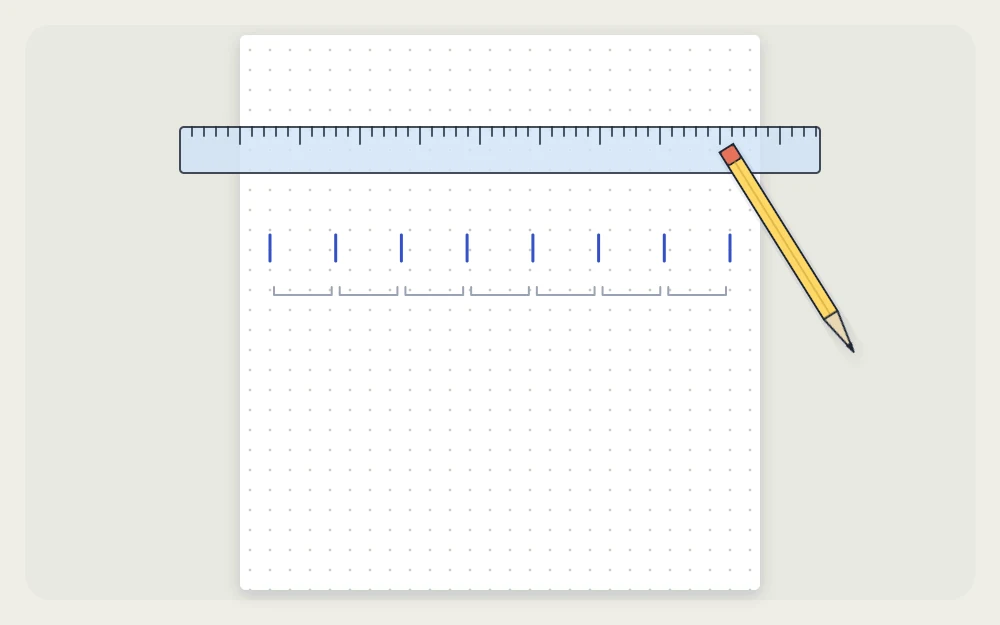
- Make a small tick every 6 squares along that row on both pages, skipping the 2 squares of margin at the fold.
- Draw the top line of the header row across each page, then a second line 2 squares below it.
- From the second line, mark the left edge every 6 squares, or every 5 for a six-row month, and draw the horizontal row lines across both pages.
- Draw the vertical lines down from each tick to the bottom of the grid.
- On the right page, leave the last 6-square column free of row lines. This is the sidebar.
Watch out
The fold is where grids go wrong. Count down from the top row of dots on each page, not from the paper edge, because the dots do not always sit at the same distance from the edge on both pages.
Ink the lines and add the dates
Ink the horizontal lines first, then the verticals, pulling the pen along the ruler in one pass. Let the ink dry for about a minute, then erase the pencil.
Write the day names, or their first letters, in the header row. Then number the cells. Find the first of the month on your calendar, place it in the correct column of the first row and continue from there, writing each date small in the top-left corner of its cell so the rest stays free.
Shade the unused cells lightly with pencil, and write the month name in the title area above the grid.
Use the sidebar
The 6-square column on the right page holds whatever does not belong to a single date:
- Tasks to finish at some point this month
- Bills and deadlines to remember
- Birthdays, if you prefer them in one list
- Items to carry into next month
Fill the grid from your future log first: anything parked there for this month moves into its date cell or into the sidebar. Write events in the cells with only a few words each, and keep the details for your weekly or daily pages.
A one-page variation
If you want more list space, shrink the grid to the left page. Seven columns of 3 squares take 21 squares, and the remaining 3 squares form a narrow notes column down the side. Rows stay 5 or 6 squares tall. The right page is then free for a full monthly task list.

Cells 3 squares wide, a little over half an inch (1.5 cm), hold a date and a symbol or one short word. This version suits months with few dated events and many tasks.
Other ways to lay out a month
A grid is not the only way to lay out a month. If you have few appointments, a plain day list may serve you better, and the comparison of monthly log layouts sets the formats side by side. To plan what you want to get done, not just when, pair the calendar with a monthly goals page.
Frequently asked questions
How many squares wide should each column of a monthly grid be?
On an A5 dot-grid page with 24 usable squares, columns of 6 squares let four days fit on the left page and three days plus a sidebar on the right. For a grid on a single page, use 3-square columns. Always count your own page before ruling.
What do I do when a month needs six rows?
Either draw six rows of 5 squares instead of five rows of 6, which fits the same 30-square frame, or keep five rows and divide the last cell with a diagonal line so two dates share it. The second option keeps every other cell larger.
Should I set up the monthly spread before the month starts?
Yes, a few days ahead is ideal. Drawing it in the last week of the current month gives you time to move dates across from the future log and to note appointments as they come up, so the page is ready to use on the first day.