Bullet Journal Future Log: 3 Simple Layouts That Work
What a future log holds, when to check it and how to draw three simple versions: six boxes over two pages, a vertical timeline, and mini calendars with an event list.

Tutorial at a glance
Materials
- Fine black pen (0.3 mm fineliner for small dates)
- Pencil and eraser
- 6-inch (15 cm) ruler
- A calendar for checking weekdays
A bullet journal future log is where you park anything that belongs to a month you have not set up yet: a car inspection in eight weeks, a birthday in the spring, a deadline at the end of the quarter.
It usually covers six months on two pages. Below are three original layouts, from the quickest to the most detailed, along with the simple routine that makes the page worth having.
What goes in the future log
The future log is a holding area, not a calendar you consult every day. It suits three kinds of entry:
- Dated events: birthdays, trips, weddings, school terms.
- Deadlines: renewals, applications, annual bills.
- Tasks for a later month with no fixed day, such as “book flights” under May.
Write each entry on one line: the day number, the bullet from your bullet journal key, then a few words. Undated tasks go at the bottom of the month’s space. Anything for the current month belongs in the monthly log instead.
Before you draw: count your page
All three layouts depend on dividing the page height evenly. A typical A5 dot-grid page (5.8 x 8.3 in, 148 x 210 mm) has roughly 26 squares across and 38 down, but this varies, so count your own and adjust the numbers below.
Draw every line in pencil first. A future log stays in use for half a year, and a miscounted box is harder to live with here than on a weekly page.
Layout 1: six boxes over two pages
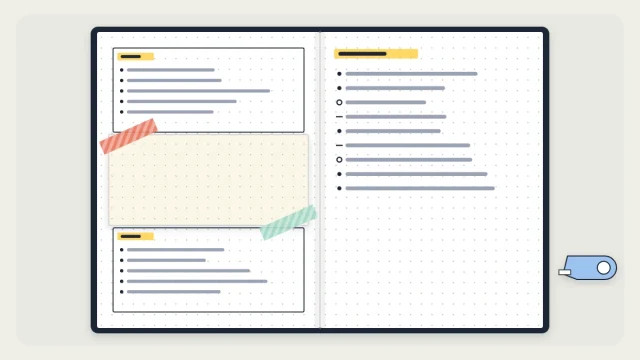
This is the quickest version: three stacked boxes on each page, one per month.
- Count the rows on your page. With 38 rows, plan three boxes of 12 rows each with one empty row between them.
- Make small pencil marks down the left edge of both pages where each box starts and ends.
- Rule the horizontal lines with your ruler and pen. You can close the boxes with vertical sides or leave them open.
- Write a month name in the top row of each box and underline it.
- Erase the pencil marks once the ink is fully dry.
Each box gives you about ten writing lines, which is enough for most months.
Layout 2: a vertical timeline
If you only have a handful of future entries, a timeline fits six months on a single page.
- Rule a vertical line down the page, about 5 squares in from the left edge.
- Starting 2 rows from the top, draw a small circle on the line every 6 rows. Six circles use 36 rows.
- Write a short month name to the left of each circle.
- Write entries to the right of the line, in the rows below each circle.
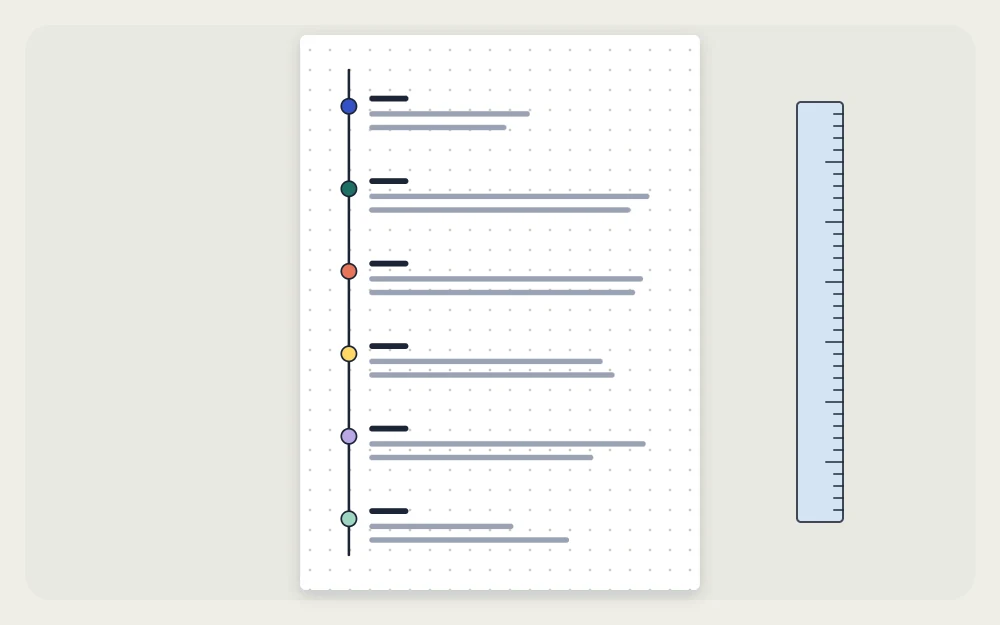
Each month gets five lines here. For more room, spread the timeline over two pages with three circles per page, 12 rows apart.
Layout 3: mini calendars with an event list
This version shows which weekday a date falls on, which helps when you plan around weekends.
- Rule a vertical line 8 squares in from the left edge of each page.
- In the left column, pencil in three calendar blocks per page. Each block is 7 squares wide and 8 rows tall: one row for the month name, one for weekday initials and up to six for the weeks. Leave 5 empty rows between blocks.
- Write the dates into each block with a fine pen, such as a 0.3 mm fineliner.
- Use the wide right column, level with each calendar, for that month’s entries.

When you add an entry, circle its date in the mini calendar as well. The circles show at a glance which weeks are already filling up.
Watch out
Check a real calendar for the first weekday of each month before you ink the dates. One wrong starting column shifts every date in that block.
Which layout to choose
| Layout | Pages | Rough drawing time | Suits |
|---|---|---|---|
| Six boxes | 2 | About 10 minutes | Most people; a steady number of entries |
| Vertical timeline | 1 or 2 | About 10 to 15 minutes | Few future entries; small notebooks |
| Mini calendars | 2 | About 30 to 40 minutes | Planning around weekdays and weekends |
If you are unsure, begin with the six boxes. You can try another format when these six months run out.
When to check it and how entries move
Entries travel in two directions.
Into the future log
When something for a later month turns up during the day, write it in your daily log as usual. At your next review, copy it into the right month of the future log and change its bullet in the daily log to <, the mark for “scheduled”. This is one of the outcomes covered in bullet journal migration.
Out of the future log
The future log has one fixed appointment: the day you set up a new month. Before you fill in the new monthly spread, open the future log, find that month and copy every entry across. Dated items go onto the calendar, and undated tasks join the month’s task list. Tick each line as you copy it, so you can see nothing was left behind.
A quick look at the next month’s box during your weekly planning is also worthwhile, because some events need preparation that starts earlier.
When the six months run out
Do not wait for the final month. When four or five of the six are behind you, draw a new future log on the next free spread and copy over anything still waiting in the old one.
Tip
Add the new future log to your bullet journal index right away. It will sit in the middle of the notebook, where it is much harder to find than the first one.
Frequently asked questions
How many months should a future log cover?
Six months on two pages is the usual choice and gives each month a reasonable amount of space. You can cover twelve months by using four pages, or by halving each box if you rarely have more than four or five advance entries in any month.
What is the difference between a future log and a monthly log?
The monthly log is the working page for the month you are in, with every date and a task list. The future log is a compact holding area for the months ahead. Entries wait there until you set up that month, then get copied into its monthly log.
How often should you check the future log?
At minimum, once a month, on the day you draw the next monthly log, so that every waiting entry is carried across. A brief look during weekly planning also helps, since some events need bookings or preparation before their own month begins.