Cleaning Schedule Spread: A Household Planner for Your Journal
Plan household tasks with a weekly grid of days by task, room-by-room checklists, a daily, weekly and monthly frequency table and a seasonal list.
Tutorial at a glance
Materials
- Fine black pen
- Pencil and eraser
- 6-inch (15 cm) ruler
- Three mild-color highlighters
A cleaning schedule spread answers two questions that are easy to lose track of: which household tasks belong to this week, and when a less frequent job was last done. Putting them on paper turns a vague list into a plan you can share out, check off and reuse.
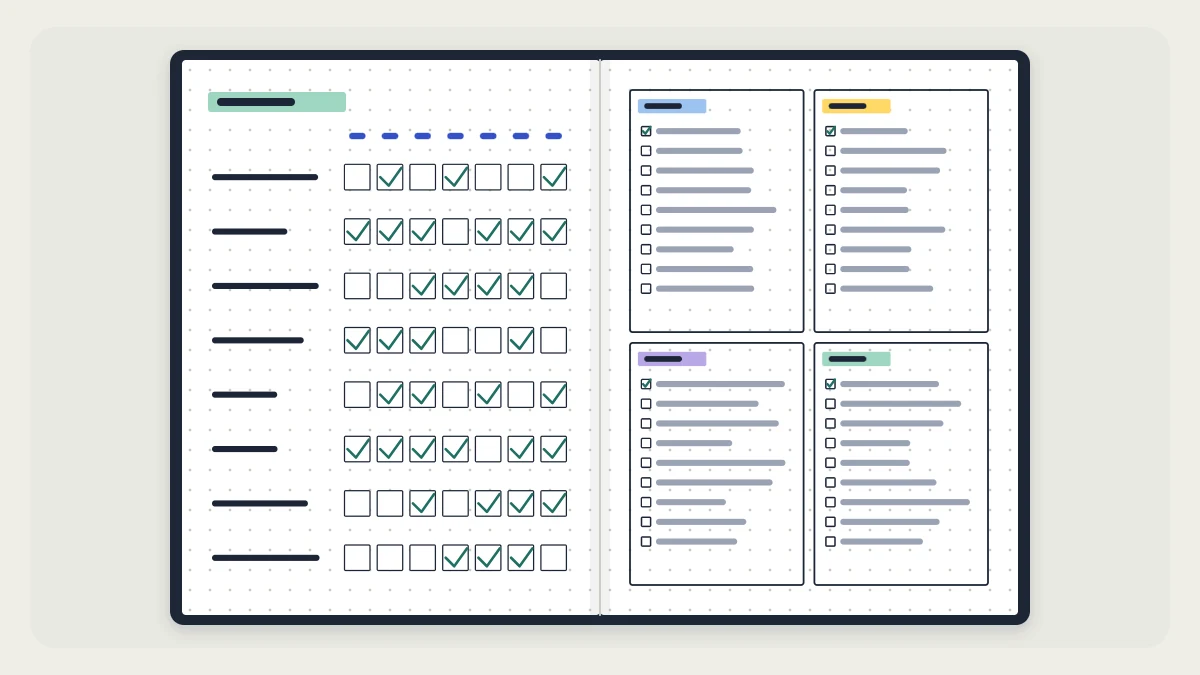
The spread below pairs a weekly grid on the left page with room checklists on the right. A frequency table and a seasonal list handle the jobs that come around less often. All of it is an organizing tool; how often anything gets done is for your household to decide.
Sort your tasks by frequency first
Before you draw anything, write every household task you can think of on a scrap page. Then sort them into three groups: daily, weekly and monthly. This sorting decides which layout each task goes into.
| Daily | Weekly | Monthly |
|---|---|---|
| Wash dishes | Vacuum floors | Wipe inside the fridge |
| Wipe kitchen counters | Change bed linens | Dust shelves and frames |
| Tidy the living room | Take out recycling | Wash windows inside |
| Sort the mail | Water the plants | Sort the pantry |
These are examples only. Move tasks between columns until the table matches how your home actually runs, and leave out anything that does not apply.
In the notebook, the same table becomes a page of three checkbox columns. Give each column a header bar in a different color, and reuse those three colors anywhere else the tasks appear, so the frequency of a task is visible at a glance.

Draw the weekly grid
The weekly grid goes on the left page and holds the daily and weekly tasks. Rows are tasks; columns are the days. The numbers assume an A5 dot-grid page roughly 26 squares wide and 38 tall, so count your own page and adjust.
- Use the top 2 rows for a header.
- Reserve a task column 10 squares wide on the left.
- To the right, mark seven day columns of 2 squares each. That uses 14 squares, for a grid 24 squares wide with a 1-square margin on each side.
- Write the day initials in a header row above the columns.
- List tasks down the left, one every 2 rows. Twelve to fifteen tasks fit on the page.
- Rule the horizontal lines in pencil, then the vertical ones. Check the spacing and ink the grid.
- In each row, draw a small checkbox only on the days the task is planned. Daily tasks get seven boxes; a weekly task gets one.
Step 7 is what makes the grid a schedule. An empty cell means “not planned today”, and a box means “planned”. Tick the box when the task is done.
Tip
Spread the weekly tasks across different days as you place the checkboxes. A quick look down each day column shows whether one day has ended up with too many boxes.
Reuse the grid without redrawing it
Drawing the grid takes roughly 20 minutes, which is too long to repeat every week. There are three ways around that:
- Four-week grid. Divide each day cell into a 2-by-2 block of small squares, one per week of the month. One grid then lasts a month.
- Weekly tick columns. Replace the day columns with four or five week columns for tasks that have no fixed day.
- A row in your weekly pages. Keep this spread as the master plan and copy only that week’s tasks into your regular week. Several of the formats in the roundup of weekly spread layouts have a sidebar that suits a short household list.
A small recurring list also works as a tracker row. The grids in the guide to habit tracker layouts can hold a few daily household tasks beside your other items.
Room-by-room checklists
The right page holds four boxes, two across and two down, one per room or area: for example kitchen, bathroom, bedroom and living room. On a page 26 squares wide and 38 tall, each box can be 11 squares wide and 16 tall, with 2 squares between them.
In each box, write the room name at the top and list the tasks that belong to a full pass of that room, each with a checkbox. These lists serve a different purpose from the grid. The grid tells you when; the room list tells you what “done” means for that room, which is useful when you hand a room to someone else or tackle one room in a single session.

A tiny icon in the header of each box, such as a pot, a bathtub, a bed or a sofa, helps you find a room quickly. All four can be drawn from rectangles and curves; the article on simple bullet journal doodles shows how to build icons like these.
Monthly tasks: record the date
Monthly jobs are the ones people forget, mostly because nobody remembers when they were last done. Give them their own short table with the task on the left and twelve small squares to the right, one per month. When you do the task, write the day of the month in that square.
A seasonal list
Some jobs come up only a few times a year: clearing gutters, swapping seasonal clothes in the closet, washing curtains, sorting the garage, checking outdoor furniture before storing it. Divide a page into four boxes, one per season, and list these jobs in the season where they fit your climate and home.
Each time a new season begins, copy that box’s tasks into your monthly log as ordinary task bullets so they get a date.
Keep the spread realistic
After the first two or three weeks, look at which boxes stayed unticked. That usually points to a planning issue: too many tasks on one day, or a frequency that does not match your household. Move the task to another day, lower its frequency, or remove it. A schedule with fewer rows that you actually follow is more useful than a full page you stop opening.
Finally, add the spread to your index and mark the page with a tab or a strip of washi tape along the edge. This is a page you return to all year, so it should be easy to reach.
Frequently asked questions
How do I decide which tasks are daily, weekly or monthly?
There is no single right answer; it depends on the size of your home, who lives there and how much time you have. List every task, make a first guess for each, and adjust after two or three weeks based on which checkboxes you actually ticked.
Do I have to redraw the cleaning schedule every week?
No. Divide each day cell into four small squares so one grid lasts four weeks, or keep the spread as a master plan and copy only the current week's tasks into your regular weekly pages. Either way you draw the full grid about once a month or less.
How can a household share one cleaning schedule in a notebook?
Assign each person a color or an initial and write it in the checkbox for the tasks they are taking. Leave the notebook open on a shelf or counter where everyone can reach it, and let each person tick their own boxes as tasks get done.