Bullet Journal Daily Log: Layouts for Busy and Quiet Days
Three ways to lay out a day in your notebook: a rapid-log list, a time-blocked column and a tasks and notes split. Includes when dailies beat weeklies and how much space a day needs.
A bullet journal daily log is a dated list of what happens in one day: tasks, events and notes, written as short lines as the day goes on. It is the page you will use most, and it needs less setup than any other part of the notebook. A date and a first entry are enough to begin.
That simplicity leaves room for choice. Some days are a string of appointments, others are a handful of errands, and one format does not suit both. Below are three ways to lay out a day, with guidance on how much space to give it and when to set it up.
What goes in a daily log
In the Bullet Journal method, created by Ryder Carroll and described on the official Bullet Journal site, daily entries are written by rapid logging: one short line per item, each starting with a symbol that says what kind of item it is.
- A dot (•) for a task
- An open circle (○) for an event
- A dash (–) for a note
A finished task has its dot turned into an X. A task moved to another day gets a right arrow (>), and one sent to the future log gets a left arrow (<). A cancelled task is struck through. The bullet journal key explains each symbol and the signifiers you can add in front of them.
Layout 1: the rapid-log list
Write the date at the left margin, underline it or leave it plain, and start the list on the next row. Tasks, events and notes all go in one column in the order they come up. There is nothing to draw.
This is the default format and the one to use on ordinary days. It takes as many rows as the day needs, and the next day starts one or two rows below the last entry. On an A5 page with about 38 rows, two or three short days can share a page.
Its weak point is time. A list shows what needs doing but not when, so a day with five appointments can be hard to read at a glance.

Layout 2: the time-blocked column
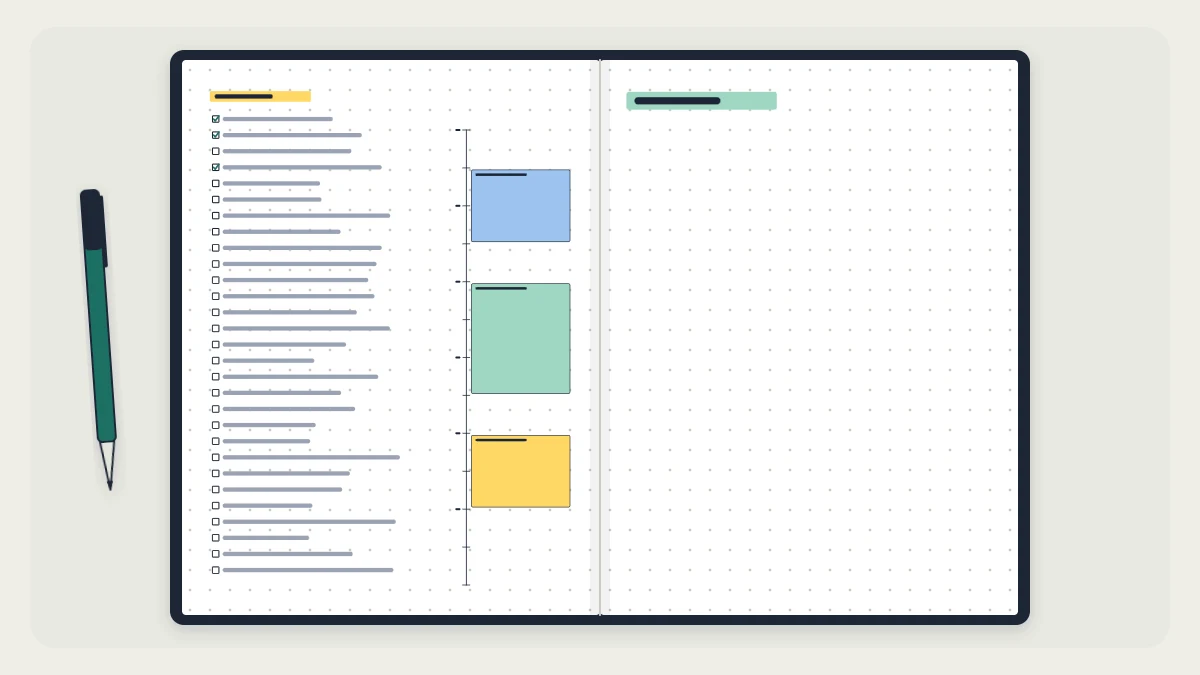
For a day built around fixed times, add a time ladder: a narrow vertical column with a tick for each hour.
- Draw a vertical line 4 squares in from the left margin.
- Decide which hours you need. Fourteen hours, for example 7 a.m. to 9 p.m., at 2 squares per hour uses 28 rows.
- Write the hour numbers in the narrow column, one every 2 squares.
- Block out each fixed commitment by outlining or lightly shading the squares it covers, and write a word or two beside it.
- Use the space to the right of the ladder for the day’s task list.

With 2 squares per hour, each square stands for 30 minutes. The gaps between blocks show how much open time the day has, and you can pencil tasks from the list into them.
Watch out
A time ladder has a fixed height, so it has to be drawn before the day starts, and it uses most of a page. Keep it for the days that need it instead of drawing one every morning.
Layout 3: the tasks and notes split
Divide the day’s area into two columns with one vertical line. On a page 26 squares wide, a line at 13 squares gives two equal halves; a line at 10 squares gives a narrower task column and more room for notes.
Tasks and events go on the left, each with its symbol. The right side is for notes: details from a meeting or class, phone numbers, ideas, things to look up. Keeping them apart means the task list stays short and scannable while the notes run as long as they need to.
Use this on days with a lot of incoming information, or when you want to find a note again later.
When a daily log beats a weekly spread
A weekly spread gives each day a fixed area, often about 15 rows. A daily log gives each day whatever it takes. Dailies tend to fit better when:
- Your days regularly produce more than a dozen entries
- You take notes during the day as well as listing tasks
- The length of your days varies a lot, so fixed boxes end up either cramped or empty
- You prefer not to draw a layout in advance
A weekly works better when you need to see several days at once to plan around them. The two also combine well: a light weekly overview for appointments and deadlines, with daily logs on the pages that follow. The guide to weekly spread layouts includes versions that leave the task writing to the dailies.
How much space to give a day
Do not reserve space ahead of time for a rapid-log list. Start each day where the last one ended, and if fewer than about 6 rows remain on a page, begin the new day on the next page instead of splitting it.
A time-blocked day needs a full page, or at least a full column of 28 or more rows.
Setting up the night before or as you go
The night before. Write tomorrow’s date, check the monthly log and any weekly spread for items due, and copy them in. Look over today’s open tasks and decide which move forward; that small review is migration on a daily scale. A time ladder should be drawn at this point, since it takes roughly 5 to 10 minutes that you may not have in the morning.
As you go. Write the date when you first open the notebook and add entries as they happen. This suits the plain list, and it means a missed day costs nothing: there is no empty pre-drawn page, just the next date under the last one.
Tip
Avoid dating pages for the days ahead. Plans change, a day gets skipped, and dated blank pages turn into wasted paper.
If you are still setting up your first notebook, the first setup guide shows where the daily log sits among the index, key and monthly log.
Frequently asked questions
Do I need a daily log if I already use a weekly spread?
Not necessarily. If your day boxes hold everything comfortably, the weekly spread is doing the job. Add daily logs when the boxes overflow, when you take notes during the day, or on unusually full days. The two can sit side by side, with the weekly as an overview.
How many pages does a daily log take?
It depends on the day. A plain rapid-log list may take a dozen rows or so, which lets two or three days share an A5 page. A time-blocked layout usually needs a full page. Do not reserve space in advance; start each day directly below the previous one.
What should I do if I miss a day?
Nothing needs fixing. Write the next date under your last entry and carry on. Because daily logs are not drawn in advance, a skipped day leaves no blank page behind. If tasks from before the gap are still open, copy the ones that still matter into the new day.